This article explains how to reconcile an Account Group based on movement (change) between periods when the group’s reconciliation policy is set to Reconcile against Change.
When an account or account group uses this policy, reconciliation is performed on the movement between periods rather than on a single ending balance.
The system displays:
-
Starting Balance (prior period ending balance)
-
Ending Balance (current period ending balance)
-
Change — the difference between the starting and ending balances
This Change value is what users reconcile using supporting items and adjustments, enabling a clearer and more accurate reconciliation process when analyzing period-to-period movement.
For Account Groups:
-
The group starting balance is the sum of member accounts’ ending balances from the immediately prior period.
-
The group ending balance is the sum of member accounts’ ending balances for the current period.
-
The group change equals Ending − Starting.
-
The unreconciled difference is driven by group-level supporting items and adjustments, using the change amount rather than a single GL balance.
Each member account row also shows its own starting balance, ending balance, and change; group totals are the sum of those values.
Reconcile an Account Group against Change
-
Navigate to the Task list and open the Account Group Task.
-
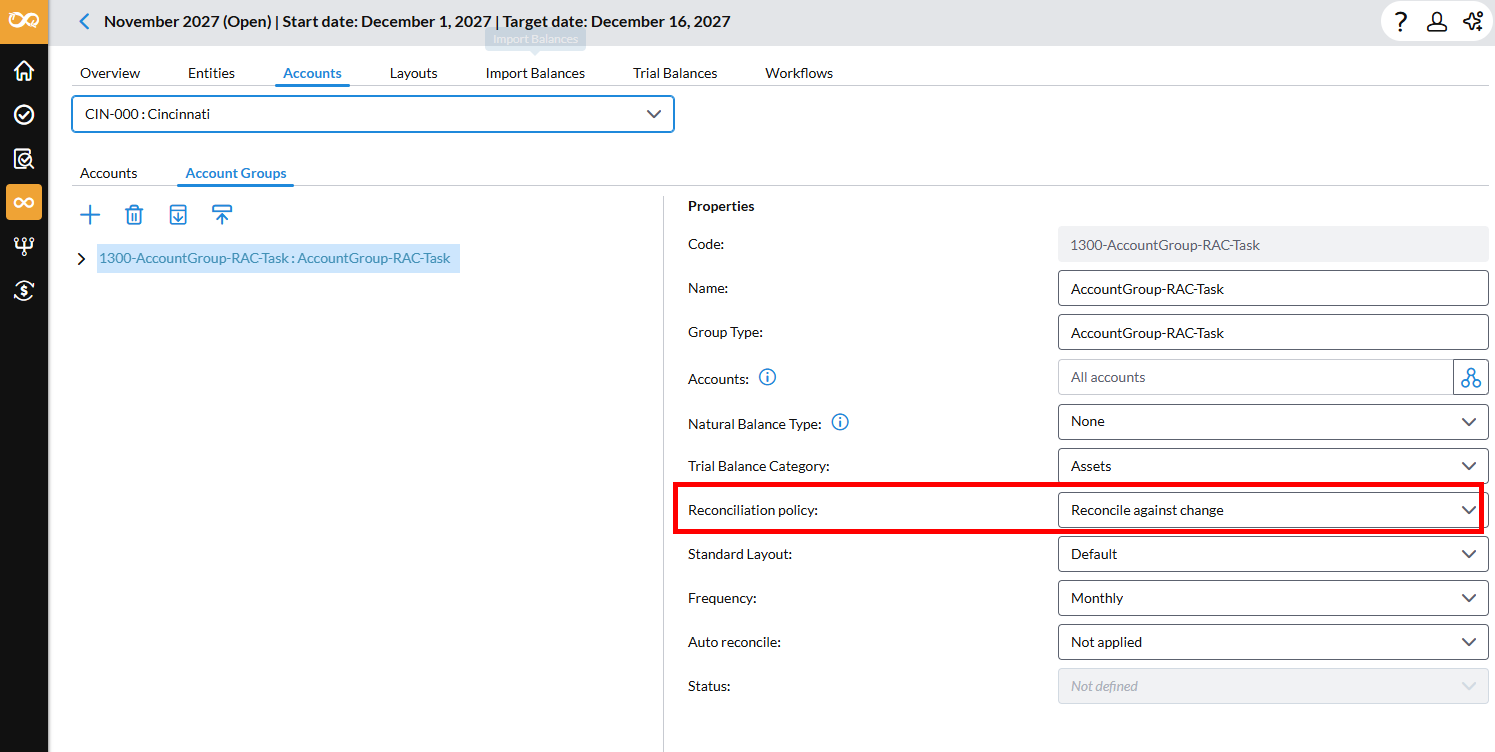
Check that the Account Group is configured with Reconcile against Change as its reconciliation policy.
-
Review group-level Summary (Starting, Ending, Change).
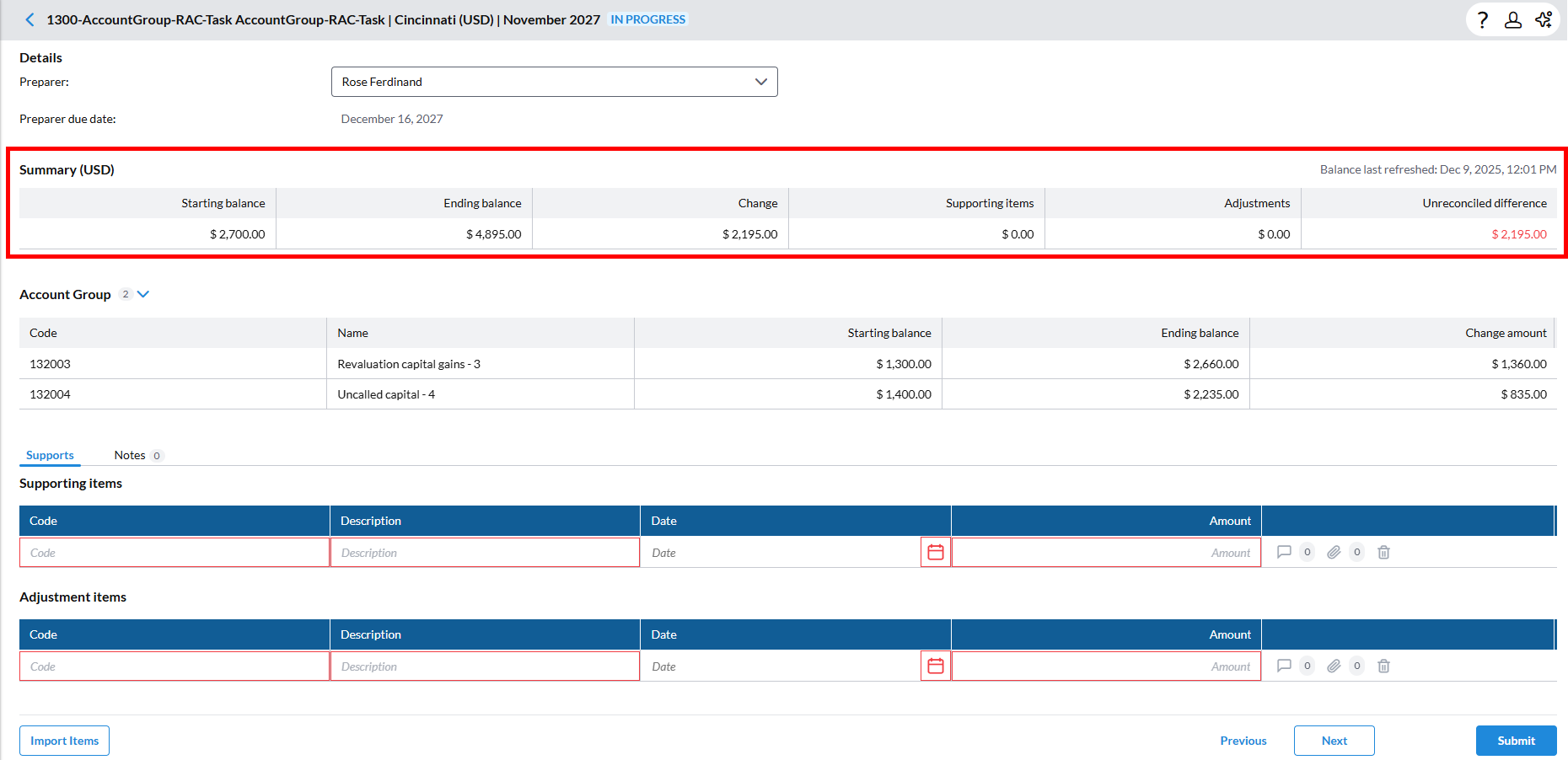
In the group task Summary review the group-level balances:
-
Starting balance (group)
-
Sum of member accounts’ ending balances from the immediately prior period.
-
If a member account did not exist in the prior period, its starting balance is treated as 0.00 for that period.
-
-
Ending balance (group)
-
Sum of member accounts’ ending balances for the current period.
-
-
Change (group)
-
Computed as: Ending balance (group) − Starting balance (group)
-
-
Supporting items total (group)
-
Sum of all supporting items entered for the group task.
-
-
Adjustments total (group)
-
Sum of all adjustments entered for the group task.
-
-
Unreconciled difference (group)
-
Unreconciled difference = Change − (Supporting items total + Adjustments total)
Note: Negative values are typically displayed in parentheses.
-
-
-
Review member account rows.
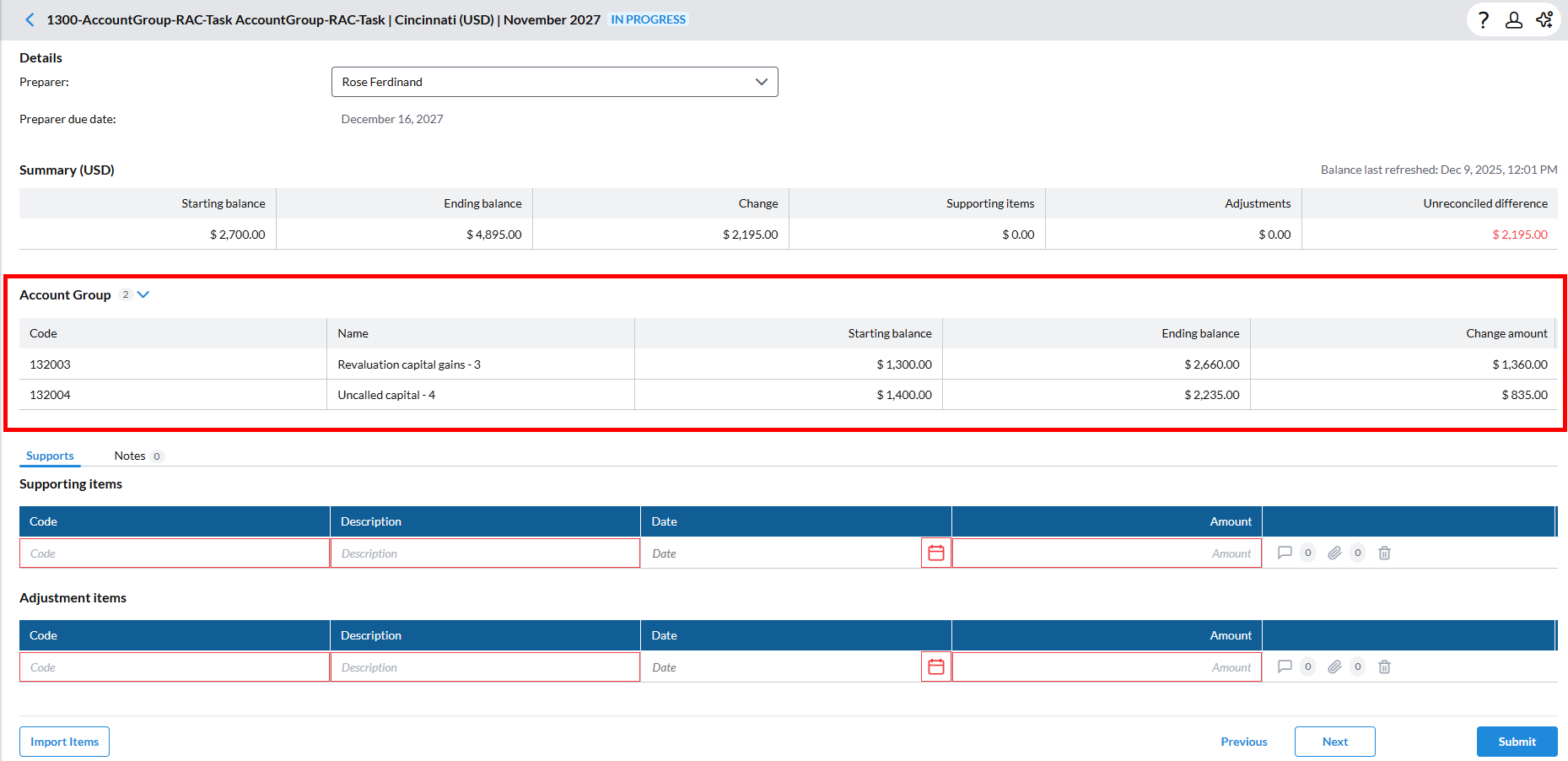
Within the group, each member account row displays:
-
Starting balance (per account)
-
Ending balance (per account)
-
Change amount (per account)
The group totals shown in the Summary are the sum of these member-level values.
Use these rows to:
-
Spot which accounts are driving the movement
-
Investigate unusual changes at the account level
-
-
Add group-level Supporting Items
To justify the group’s movement:
-
In the group task, go to the Supporting Items area for the Account Group.
-
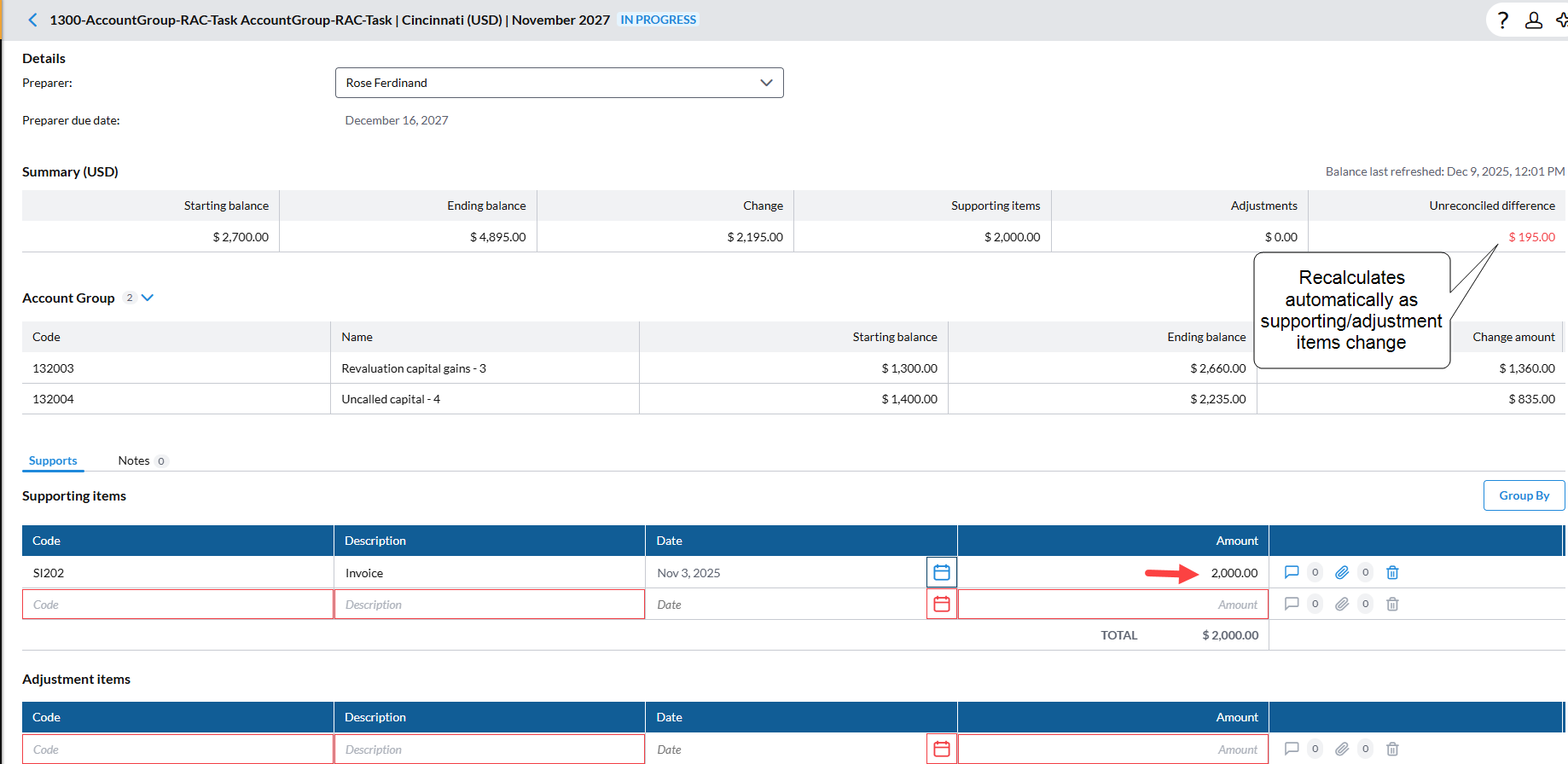
Add supporting items that explain the group’s change (for example, reclassifications, manual adjustments, etc).
-
Confirm that the Supporting items total (group) updates.
-
-
Add group-level Adjustments (if required)
If you need to capture manual or correcting entries at the group level:
-
Navigate to the Adjustments section of the group task.
-
Add or edit adjustments as needed.
-
Confirm that the Adjustments total (group) updates.
-
-
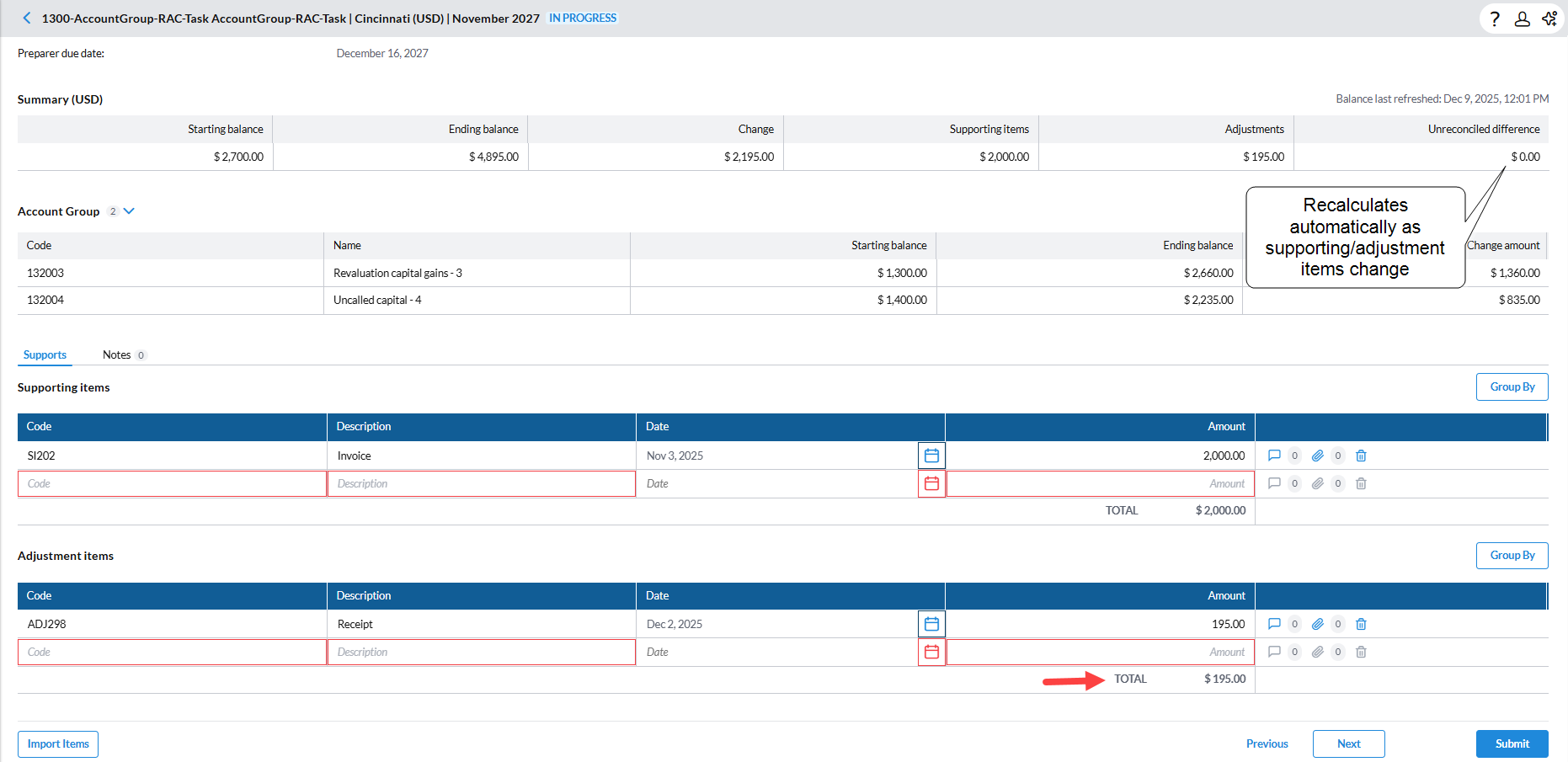
Check the Unreconciled difference (Group)
The Unreconciled difference (group) recalculates automatically as you change:
-
Group-level supporting items
-
Group-level adjustments
Use this value to determine whether the group is fully reconciled or if there is remaining unexplained movement.
-
-
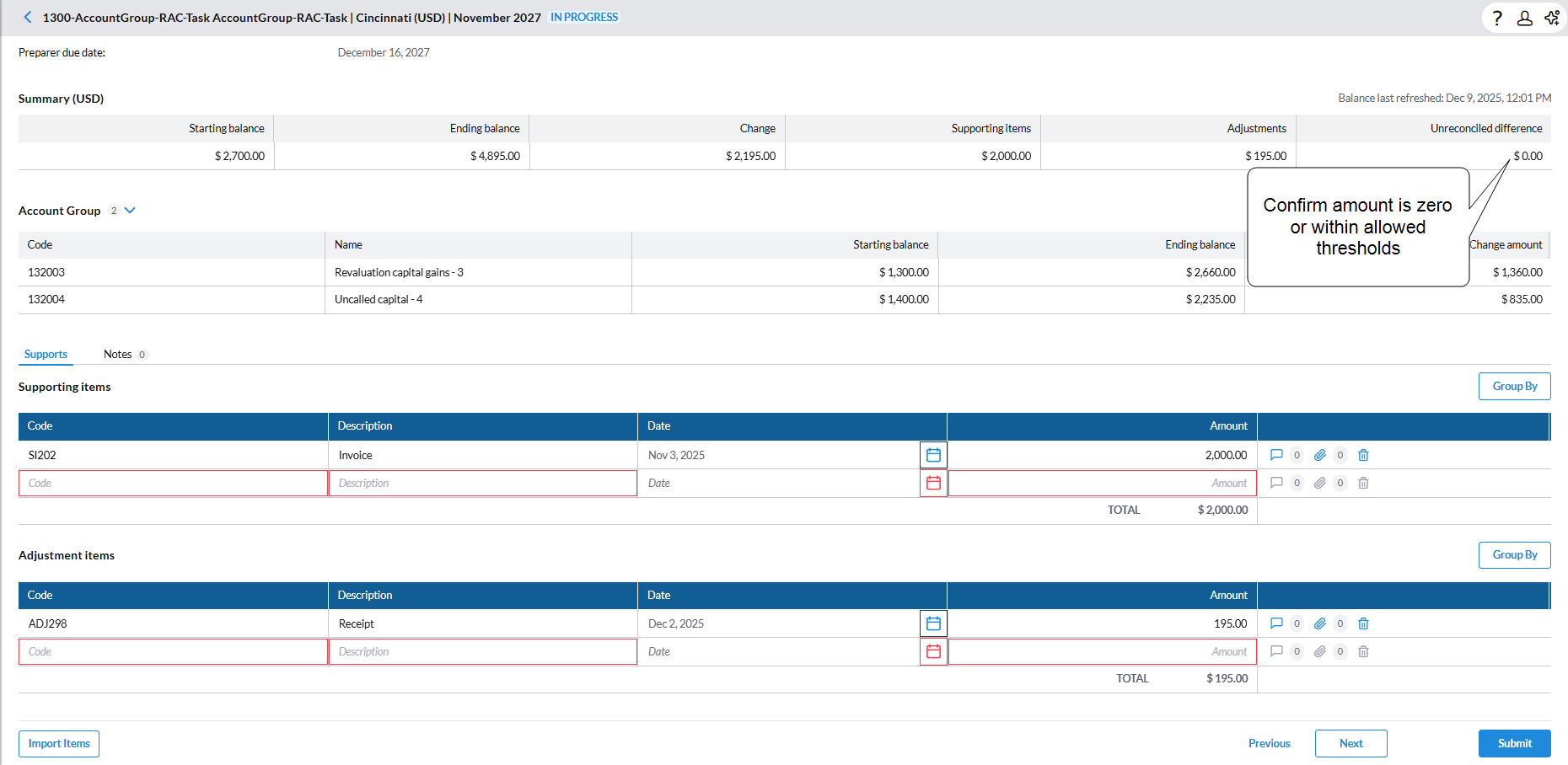
Confirm that the Unreconciled difference (group) is zero or within allowed thresholds.
-
Once the group’s movement is fully justified, submit the task for approval, according to your workflow.
How recalculation works for Account Groups
The system automatically recalculates group starting balance, ending balance, change, and unreconciled difference when:
-
Member account ending balances change in the current period
-
Member account ending balances change in the prior period (which affects the current starting balance)
-
Group-level supporting items or adjustments are added, modified, or removed
Rounding follows the same rules as other balances in the application.
Example: Where there is no movement
-
Starting balance: $200,000
-
Ending balance: $200,000
-
Change: $0
-
Supporting items: $0
-
Adjustments: $0
-
Unreconciled difference: $0
Example: Increase explained by Supporting Items and Adjustments
-
Starting balance: $200,000
-
Ending balance: $260,000
-
Change: +$60,000
-
Supporting items: +$45,000
-
Adjustments: +$10,000
-
Unreconciled difference: +$5,000
Example: Decrease with partial explanations
-
Starting balance: $200,000
-
Ending balance: $150,000
-
Change: −$50,000
-
Supporting items: −$35,000
-
Adjustments: −$10,000
-
Unreconciled difference: −$5,000
Example: New member account (No prior period)
-
Members A–C existed last period; Member D is new
-
Starting balance: $150,000 (A+B+C) + $0 for D
-
Ending balance: $200,000
-
Change: +$50,000
-
Supporting items: +$30,000
-
Adjustments: +$15,000
-
Unreconciled difference: +$5,000
How Natural Balance type affects Account Group rollforward
Account Group rollforward balances respect the Natural Balance Type assigned to the group.
Natural Balance Type Rules
-
Credit
(Sum of credit accounts)
-
(Sum of none accounts) − (Sum of debit accounts)
-
-
Debit
(Sum of none accounts) − (Sum of credit accounts)
-
(Sum of debit accounts)
-
-
None
(Sum of credit)
-
(Sum of none)
-
(Sum of debit)
-
Note: If the Account Group’s Natural Balance Type is changed in a prior period, the current period’s starting balance updates in real time.