DI transaction matching record validation
This article is for administrators who import transaction data into Account Reconciliation for use with Transaction Matching.
When you import transaction data for Transaction Matching, Account Reconciliation checks every record in the staging table against the Entity, Account, and Period expected for the import job. Records that match proceed through the existing validation and import process. Records that do not match are rejected and reported in the import result log, so you can see exactly which records were skipped and why.
How records are validated
Every record in the staging table for the import job is checked against the Entity, Account, and Period expected for that job:
-
If Entity, Account, and Period all match, the record proceeds through the existing validation and import steps.
-
If one or more of Entity, Account, or Period does not match, the record is rejected. The result log identifies which field or fields did not match.
-
Rejected records appear in the result log in the same order in which they appear in the source staging data, so you can trace a rejection back to its original record.
-
Rejected records are included in the total rejected-record count in the result log summary.
Result log messages
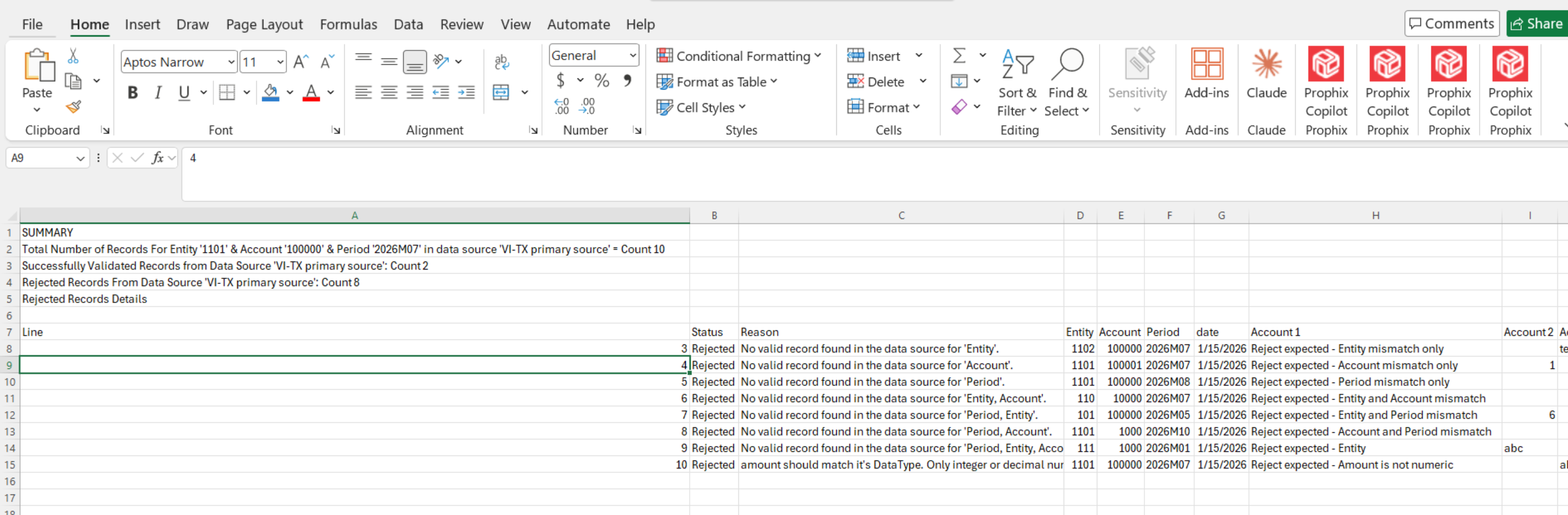
When a record is rejected because a field does not match, the result log displays:
No valid record found in the data source for '<field name>'.
Result log summary section
The result log for Transaction Matching includes a summary section with the following counts:
-
Total number of records found for the specified Entity, Account, and Period in the data source
-
Number of records successfully validated
-
Number of records rejected
Example:Total Number of Records for Entity '001', Account '100200', and Period '2026M06' in data source 'Import_TX_Date': Count 10
Successfully Validated Records from Data Source 'Import_TX_Date': Count 8
Rejected Records from Data Source 'Import_TX_Date': Count 2
Missing column message
If a required column is missing from the data source, Transaction Matching displays:
The required 'Amount', 'Date', 'Description' column was not found in data source '<data source name>'.
Amount data type validation
If the Amount value in the data source is not a valid number, Transaction Matching displays:
Amount should match its data type. Only integer or decimal numbers are allowed.