Release Notes
2025.9.1
September 2025
Release notes describe the enhancements and bug fixes contained in new releases and maintenance releases.
Tip: To find the release note that contains a specific issue, search on the Prophix Support Desk ticket number.
What’s new
Reconciliation Agent
The Reconciliation Agent, part of the Prophix One Copilot, is an AI-powered assistant that gives you instant answers to common close management questions.
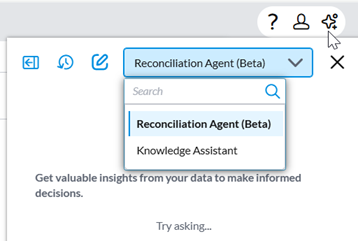
You can quickly check the status of the current period close, view projected close dates, and track user performance. For more information, see Reconciliation Agent.
Transaction matching enhancements
This release includes several improvements to transaction matching that increase accuracy and streamline the process.
Custom thresholds
Set thresholds using Model Settings:
-
Absolute Thresholds: Allow matches within a fixed dollar amount (e.g., within $10).
-
Date Thresholds: Allow matches within a specified number of days (e.g., dates within 4 days).
-
Percentage Thresholds: Allow matches within a defined percentage difference.
The system shows the applied threshold reason (e.g., Dates within 4 days or Amounts within 10%).
For more information, see Set thresholds for transaction matching.
Additional columns
-
Users can load and store custom fields beyond the default ones. Custom fields are for reference only and not used in matching logic.
-
Supported data types: String, Date, Number, Decimal.
Add adjustments directly to matched transactions
Users can now add adjustments directly to matched transactions without first unmatching them.
Depreciation schedule enhancements
This release includes two additional depreciation methods, alongside the Straight Line method:
-
Double Declining Balance (DDB) : Accelerates depreciation by applying a higher rate in the earlier periods of an asset’s life.
-
Half-Year : Applies a half-year of depreciation in the first and last year of the asset’s life, regardless of the acquisition or disposal date.
For more information, see Set up scheduled depreciation reconciliations and Reconcile depreciation schedule items.
Invoice Date field for schedules
A new Invoice Date field has been added to schedule setup. This ensures that prepaid schedules are calculated based on the actual invoice or purchase date, rather than only the amortization start date.
-
Accurate timing of asset additions – For example, when you purchase prepaid insurance, the addition now shows in the same period as the invoice date.
-
Expense drawdown remains unchanged – The start date still determines the first period for expense drawdown.
-
No impact to existing schedules – Existing items were updated automatically, with the start date used as the invoice date.
This enhancement makes schedules more accurate and better aligned with real financial activity, improving trust in balances, additions, and reports.
Improved Rollforward Balance for schedules
The rollforward calculation has been updated for greater accuracy and consistency:
-
Beginning Balance now always equals the Ending Balance from the previous period.
-
Ending Balance is calculated as:
Ending Balance = Beginning Balance + Additions – Current Period
This enhancement provides a clearer, period-by-period view of balances and ensures that amounts do not carry over incorrectly.
Close package report enhancements
When downloading the Close Package for selected accounts within an entity, the report now displays totals only for those selected accounts.
Drag and drop attachments in comments
Users can now drag and drop one or multiple files directly into the comment text box.
-
Files are attached immediately.
-
Attachments are included when the comment is sent.
Entity reordering
-
Admins and Global Admins can now drag and drop entities in the Master Entity List to change their order.
-
The updated order appears in all drop-downs and lists throughout the product, including at the period-level and in the Account Reconciliation module, effective in the next period.
Resolved issues
The following are the issues we resolved in this release:
| Resolved | Ticket Number | Area | Description |
|---|---|---|---|
| September | 198206, 198522 | Account Reconciliation Details | Users were unable to add zero balance lines in the Supporting Items section. |
| 198709 | Account Reconciliation | Import errors in Account Reconciliation caused by Trial Balance Category settings. | |
| 198710 | Summary Dashboard | Displayed incorrect % completion and dollar values (e.g., greater than 100%). | |
| 201022 | Tasks | Submitted tasks appeared as “overdue” in the grid even though they had been submitted to the approver. | |
| 201018 | Close Management Home | Account Reconciliation filter options were not working. | |
| 202319 | Import Balance | Uploads failed due to unexpected or missing columns. |
Known issues
No known issues included in this release.